Radio Circuit - 30 Photoshop HD Brushes for Electronic Design
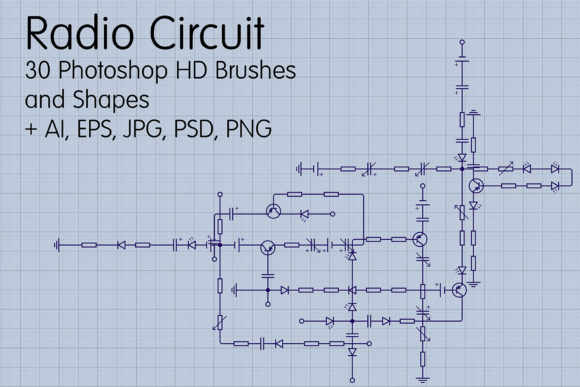
When your creative project calls for that unmistakable energy of technology and innovation, generic design assets often fall short. You need something with authentic detail, something that speaks to the intricate beauty of modern electronics. This is precisely where the Radio Circuit - 30 Photoshop HD Brushes collection excels. It's not just a set of tools; it's a curated library of 30 abstract radio circuit board vector shapes and high-definition brushes, designed to inject stunning electronic detail directly into your digital artwork.
The Anatomy of a Premium Design Asset
What sets this collection apart is its thoughtful composition and professional-grade quality. The set includes 5 large, 16 medium, and 9 small circuit designs, offering a versatile range for different scales and applications. Whether you're creating a subtle background texture for a website or a bold, intricate centerpiece for a poster, you have the right size component at your fingertips. The true value lies in the format flexibility. You receive the designs as a Photoshop .CSH custom shapes file, a .ABR brushes file, a layered .PSD, a transparent PNG, a high-resolution JPG, and vector files in both EPS 10 and Adobe Illustrator 10 formats. This means you can scale any element to any size—from a tiny icon on a mobile app to a massive banner—without ever losing crispness or quality. The vector foundation ensures your designs remain sharp and professional at any resolution.
Where Technology Meets Creativity: Practical Applications
Understanding where to deploy these assets is key to maximizing their impact. This isn't just for tech blogs. The Radio Circuit - 30 Photoshop HD Brushes collection is a powerful tool for shaping brand identity and visual storytelling across numerous domains.
- Branding & Logo Design: For startups in tech, IoT, engineering, or electronics, these circuit elements can become the core of a logo or a distinctive brand mark. They convey precision, innovation, and a forward-thinking mindset.
- Editorial & Publishing Design: Magazines, book covers, and report layouts focused on science, technology, or futurism can use these brushes to create compelling headers, section divers, and full-page backgrounds that immerse the reader in the subject matter.
- Packaging & Product Design: Imagine product packaging for high-tech gadgets, audio equipment, or even premium coffee brands aiming for a modern, engineered aesthetic. These circuit patterns add a layer of sophistication and tactile detail.
- Digital & Web Design: Use them to craft unique hero images, section backgrounds, or loading animations for websites and apps. They are particularly effective for landing pages promoting SaaS products, podcasts, or electronic hardware.
- Social Media & Marketing Graphics: Create scroll-stopping posts, YouTube thumbnails, or event banners. The abstract nature of the circuits works well for tech tutorials, podcast artwork, or promotional graphics for virtual conferences.
- Personal & Craft Projects: Hobbyists can incorporate them into digital scrapbooking, custom planner designs, or even as inspiration for physical art prints and T-shirt designs.
Strategic Design: More Than Just Decoration
Effective use of these assets goes beyond slapping a circuit board on a background. It's about influencing perception and guiding the viewer's eye. Here’s how to think strategically:
Visual Hierarchy and Focus: Use a large, detailed circuit brush as a background element to set a tech-oriented mood, then layer clean typography and key information on top. The complexity of the circuits creates a rich texture that doesn't compete with your message when used thoughtfully. A small, isolated circuit element can act as a bullet point or an icon, drawing attention to a specific feature or benefit.
Brand Perception and Consistency: Consistently using these elements across your website, social media, and print materials builds a recognizable visual language. It tells your audience, "We are technical, precise, and innovative." This consistency strengthens brand recall and professionalism.
Font Pairing and Readability: The intricate, linear nature of circuit designs pairs exceptionally well with clean, modern sans serif fonts. Think of typefaces like Helvetica Neue, Futura, or Open Sans. The simplicity of the text provides a necessary counterbalance to the detailed graphics, ensuring your headlines and body copy remain highly readable. Avoid pairing them with overly ornate script or handwritten fonts, which can clash and create visual noise.
Integrating the Assets: A Practical Guide
Before diving in, consider these practical steps to ensure a smooth workflow and professional results.
- Evaluate Your Project's Tone: Does your project genuinely benefit from a tech-inspired aesthetic? These assets are perfect for conveying innovation, complexity, and modernity. They might not be the right fit for a brand centered on organic, handcrafted, or rustic values.
- Test Before Committing: Download the ZIP archive (7.27 MB) and open the files in Photoshop or Illustrator. Experiment with the different sizes and formats. Apply a color overlay to see how the vectors adapt. Test them on a draft of your design to see if they complement your existing color scheme and layout.
- Layer and Blend: Don't just place a circuit on top of your design. Use Photoshop's layer blending modes like "Multiply," "Screen," or "Overlay" to integrate the texture more organically. Reduce the opacity for a subtle, engraved look. Stack multiple elements from the set to create unique, complex compositions.
- Respect the License: This is a commercial font and asset package. Always review the included license agreement to understand the permitted uses, especially for large-scale commercial projects or merchandise. Using design assets ethically is fundamental to professional practice.
The Radio Circuit - 30 Photoshop HD Brushes set is more than a collection of shapes; it's a versatile toolkit for designers and creators who want to communicate a message of technological sophistication. By using these assets with intention and an understanding of their strengths, you can elevate your projects from simply looking good to strategically conveying the right brand narrative and engaging your audience on a deeper level.