Procreate Hair Stamps: Paint Realistic Portraits Fast
If you have ever struggled with rendering realistic hair in Procreate, you know how tedious the process can be. It often involves hours of layering, blending, and drawing individual strands to achieve a natural look. For digital artists, character designers, and hobbyists, this bottleneck can kill the momentum of a project. That is why incorporating specialized design assets like Hair Stamps for Procreate + Palettes is a game-changer. These tools are not just about saving time; they are about elevating the quality of your illustration with professional-grade textures and colors that might otherwise take years of practice to master manually.
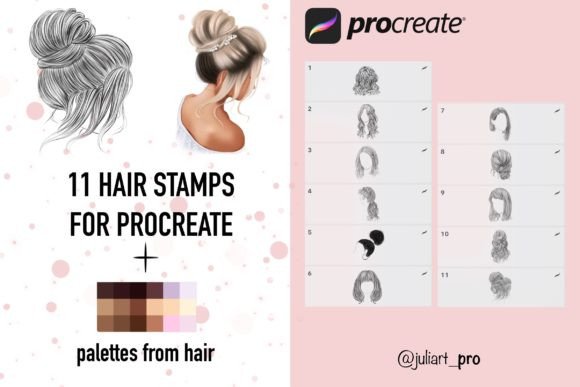
This collection of 15 hair stamps for Procreate offers a streamlined workflow for anyone using an iPad. By utilizing these stamp brushes, you can bypass the struggle of foundational hair construction and move straight to the creative details. The package includes specific brushes labeled Hair 1-11, giving you a variety of textures and styles to work with. Whether you are working on a digital portrait for a client, creating assets for a mobile game, or simply practicing character art, these brushes provide the necessary structure to build volume and depth instantly. They are designed to mimic the natural flow of hair, allowing you to lay down complex shapes with a single tap of your Apple Pencil.
Visual Characteristics and Style
The personality of these brushes lies in their versatility and realism. Unlike generic brushes that often look flat or overly digital, these stamps are crafted to respond dynamically to pressure. When you press harder with your Apple Pencil, the strokes become denser and more opaque, mimicking the way real hair clumps together and catches shadow. Lighter pressure creates softer, wispy strands perfect for flyaways and highlights. This pressure sensitivity is crucial for creating a natural visual hierarchy within the hair, distinguishing between the core shadows, mid-tones, and bright highlights that make the style pop.
Visually, the appeal of the Hair Stamps for Procreate + Palettes is in their ability to create high-fidelity results. Rendered at high quality 300 DPI, these brushes ensure that your work remains crisp whether it is viewed on a high-resolution screen or printed for a physical portfolio. The aesthetic is modern and polished, fitting seamlessly into contemporary illustration styles. The included palettes are just as important as the brushes themselves. Color selection in hair can be tricky—too saturated looks fake, while too flat looks dull. The three palettes included in this package take the guesswork out of color theory, offering harmonious combinations that suggest volume and lighting right out of the box.
Practical Applications for Creators
For the professional designer or entrepreneur, efficiency is currency. This premium font equivalent for digital illustration—meaning a high-value asset that solves a specific problem—works best across a range of creative projects. If you are a blogger or publisher creating character avatars for a brand, these stamps ensure consistency across multiple images. Content creators and marketers can use them to produce social media graphics rapidly. Instead of spending hours on a single Instagram post, you can generate engaging, stylized portraits that capture attention in a crowded feed.
Furthermore, these brushes are invaluable for packaging design and brand identity work. If your brand mascot or spokesperson is illustrated, the hair needs to look consistent across different mediums—from the website header to print brochures. Using stamps helps maintain that consistency. Hobbyists and crafters will also find immense value here. If you enjoy creating custom greeting cards, digital stickers, or fan art, the learning curve for painting hair is significantly flattened. You can focus on the expression and clothing of your character while the stamps handle the complex texture of the hair.
Integrating into Your Design Workflow
Adopting new tools requires a bit of setup, but the instruction for this asset is straightforward. The workflow is designed for the iPad ecosystem. You make the purchase, download the file, and click “Unpack.” From there, you select the specific files you need and export them directly into the Procreate program. It is a seamless integration that respects your time.
When it comes to font pairing—or in this case, asset pairing—consider how the hair textures interact with your line art. If your illustration style uses heavy, bold outlines, you might want to use the stamps to fill in the shape and then lower the opacity slightly so the linework remains the star. Conversely, if you prefer a painterly style with no outlines, the stamps can serve as the primary textural element. Because the brushes react to pressure, they function similarly to a script font or handwritten font in typography; they carry the "hand" of the artist. The harder you press, the more expressive the mark.
Compatibility and Technical Considerations
Before diving into a project, it is essential to understand the technical requirements to ensure a smooth creative process. There are two critical hardware requirements for using these design assets. First, you must have the Procreate app installed on an iPad. Second, you must use an Apple Pencil.
- Pressure Sensitivity: The brushes are engineered to react specifically to the pressure of an Apple Pencil. This allows for the nuanced shading and line weight variation discussed earlier. Without the pencil, you lose the organic feel of the strokes.
- Platform Exclusivity: These brushes are optimized for Procreate. They are not suitable for other programs and applications like Photoshop or Clip Studio Paint. If you are a multi-platform artist, keep this in mind. These are dedicated tools for the iPad workflow.
While this might seem limiting, the benefit is optimization. Because the creator designed these exclusively for Procreate, they take full advantage of the app’s rendering engine. You won't find generic brushes here that "sort of" work; these are tuned for high performance on the iPad.
Real-World Value and Final Thoughts
Ultimately, the goal of any creative font or brush set is to enhance your ability to communicate visually. For small business owners looking to create their own marketing materials, or designers aiming to speed up their production pipeline, Hair Stamps for Procreate + Palettes offers tangible value. It transforms a difficult aspect of digital art—hair rendering—into an accessible, enjoyable process.
Think of these stamps as a foundational element of your modern typography and illustration toolkit. Just as a strong serif or sans-serif font anchors a layout, a well-rendered hairstyle anchors a character portrait. By removing the friction of painting hair from scratch, you free up mental energy to focus on composition, color grading, and storytelling. Whether you are drawing a whimsical cartoon character or a semi-realistic portrait, having a library of reliable textures at your fingertips ensures that your final output looks professional and polished. For anyone serious about their digital art on the iPad, this is a practical investment in quality and efficiency.