Pattern Brushes 2 for Procreate: Instant Hand-Drawn Texture
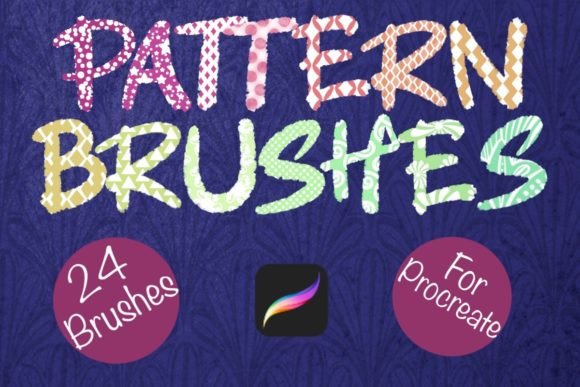
If you work in Procreate, you know the feeling: you have a solid composition, a great color palette, but the surface texture feels too digital, too sterile. You want that hand-crafted, organic vibe without spending hours drawing individual details by hand. This is exactly where Pattern Brushes 2 for Procreate changes the workflow. It isn’t a traditional typeface or a standard vector set; it is a specialized collection of 24 hand-drawn pattern brushes designed to be imported directly into your iPad workflow.
Think of these as texture stamps rather than standard brushes. The collection bridges the gap between digital precision and analog imperfection. When you utilize Pattern Brushes 2 for Procreate, you are applying designs that have a distinct "drawn" personality. These aren't computer-generated geometric grids. They are organic, slightly irregular, and full of character. This style is incredibly popular right now because it humanizes digital art. It tells the viewer that a real hand was involved in the process, which builds a layer of trust and authenticity in your design work.
The Anatomy of the Brush Set
Understanding the technical and visual nature of these assets helps you deploy them effectively. The set consists of 24 distinct patterns. Visually, they cover a wide range of aesthetics, from cross-hatching and stippling to playful doodles and intricate geometric repeats. Because they are opaque stamps, they act like solid ink. This opacity is a massive advantage for brand identity work. You don't have to fight with transparency settings or weird blending modes to get a solid look. You can drop a stamp onto your canvas, and it sits there with authority.
However, the true power lies in the customization. Because the base color is opaque, you can use Procreate’s clipping masks or alpha lock features to recolor them instantly. Need a neon green halftone effect for a vaporwave poster? You can do that. Need a subtle, cream-colored linen texture for a wedding invitation background? You can do that, too. This flexibility makes Pattern Brushes 2 for Procreate a versatile component of your design assets library, rather than a one-trick pony.
Real-World Applications for Designers and Makers
The utility of these brushes extends far beyond simple sketching. For professional creatives, this set solves specific problems across various mediums.
Branding and Packaging Design
In packaging design, texture sells the product. If you are creating a logo or label for a craft coffee roaster, an organic skincare line, or a boutique bakery, digital perfection can feel cold. Using Pattern Brushes 2 for Procreate allows you to sketch out rough concepts with authentic texture built-in. You can create background fills that mimic artisan paper or screen-printing techniques. This helps in pitching concepts to clients because the mockups already look "lived in" and high-quality.
Digital Content and Social Media
For social media graphics and web design, attention spans are short. A plain background often gets scrolled past. These stamps allow you to create complex, eye-catching backgrounds in seconds. Imagine a bold, hand-drawn checkered pattern behind a headline for an Instagram story, or a stippled shadow effect on an illustration for a blog post. These textures add depth and visual hierarchy, helping to guide the viewer’s eye to your typography or call-to-action.
Print on Demand and Merchandise
If you run a Print on Demand business, uniqueness is your currency. You cannot simply use stock vectors that everyone else has. Because these brushes are hand-drawn, they offer a unique aesthetic that feels custom-made. You can use them to create intricate mandala designs, distressed vintage looks for t-shirts, or textured backgrounds for tote bags. The ability to resize and move the stamps means you can scale them up for large format prints or keep them small for subtle detail on mugs and stickers.
Integrating Texture into Your Visual Hierarchy
Good design is about managing the viewer's eye. Pattern Brushes 2 for Procreate helps establish visual hierarchy by adding contrast. In editorial design, for instance, you might have a page dominated by clean sans serif font text. By adding a textured stamp to a sidebar or a pull quote background, you create a distinct zone that separates that information from the body copy.
Furthermore, texture influences brand perception. A brand that uses organic textures is often perceived as more approachable, creative, and authentic. Compare this to a brand that uses only sharp, digital gradients, which might feel more corporate or futuristic. By incorporating these hand-drawn elements, you soften the digital experience. This is particularly effective for bloggers, small business owners, and content creators who want to foster a community feel rather than a corporate distance.
Practical Workflow and Compatibility
It is crucial to note the technical requirements to ensure a smooth workflow. Pattern Brushes 2 for Procreate is an exclusive tool. It is designed only for the Procreate app on the iPad, and it requires an Apple Pencil to function at its best. The pressure sensitivity of the pencil allows for varying stamp application, though since these are opaque stamps, the primary interaction is placement and sizing.
The import process is seamless. Once you download the file, you can import the brush set directly into Procreate, and they are ready to use immediately. There is no complex setup or conversion required. This "plug and play" nature is vital for busy professionals. You shouldn't have to spend an hour configuring settings before you can start creating.
Testing and Pairing
When incorporating these into a project, treat them like a premium font. Don't just slap them on the canvas; test how they interact with your other elements.
- Contrast is Key: If you are using a busy, intricate pattern stamp, pair it with a simple serif font or a clean sans serif font. If your text is a flowing script font, use a simpler, larger-scale pattern like broad stripes or dots so the textures don't fight each other.
- Scale Matters: Zoom in and zoom out. A pattern that looks like a chaotic scribble at 100% might look like a beautiful cross-hatch texture at 200%.
- Color Harmony: Since the stamps are opaque, they take color well. However, try using them in monochromatic schemes. For example, a dark blue stamp on a light blue background creates a sophisticated, tone-on-tone texture that adds depth without overwhelming the design.
Commercial Use and Professional Polish
For entrepreneurs and freelancers, the value of an asset is often tied to its licensing and usability in commercial projects. These brushes are designed for personal or professional use, meaning you can confidently use them in client work, merchandise, and published media.
Consistency is a pillar of professionalism. By using a dedicated set like Pattern Brushes 2 for Procreate, you ensure that the "hand-drawn" elements in your brand look cohesive. Random free brushes found online often have varying line weights and styles, making a brand look disjointed. This set provides a unified aesthetic language. Whether you are designing a logo, creating a series of stickers, or laying out a digital planner, the consistent hand-drawn style ties the project together.
Ultimately, Pattern Brushes 2 for Procreate