Neon Brush for Procreate: A Glowing Addition to Your Digital Toolkit
What Exactly is the Neon Brush for Procreate?
Let’s cut through the noise of the digital art market. When you are working on the iPad, your tools need to be responsive, intuitive, and visually distinct. The Neon Brush for Procreate is a specialized digital asset designed to mimic the luminous, electric aesthetic of neon signage. However, unlike static textures, this is a dynamic lettering brush intended for active creation. It falls into that sweet spot of creative font territory where typography meets illustration.
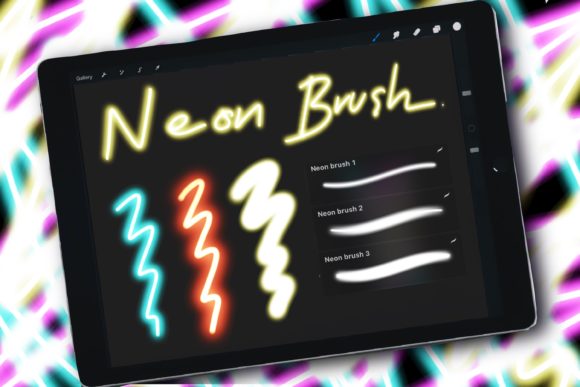
The core visual characteristic of this tool is its glow. It simulates the diffusion of light that you see in actual neon tubes—bright cores with a soft, atmospheric bloom around the edges. This is not just a standard brush with a layer effect applied; it is engineered to maintain that "light" quality regardless of the background color. One of the standout features mentioned in the tool's specification is that it doesn’t respond to color brightness. For the average user, this means consistency. You don’t have to wrestle with opacity settings or blend modes just to get the light to look right on a dark surface. It maintains its intensity, which is crucial for brand identity work where color consistency is non-negotiable.
Practical Applications for Modern Creators
Where does a tool like the Neon Brush for Procreate actually fit into a professional workflow? It is more versatile than you might think.
1. Branding and Logo Design
If you are a logo design specialist, you know that trends come and go, but the "electric" aesthetic remains popular in nightlife, entertainment, and tech sectors. Using this brush to sketch out logo concepts allows you to present clients with a vibe immediately. Instead of a flat black-and-white sketch, you can present a mockup that feels like a finished sign. It helps in pitching a brand identity that is modern and energetic.
2. Social Media and Content Creation
For social media graphics, attention spans are short. You need scroll-stopping visuals. The Neon Brush is perfect for creating Instagram Stories, TikTok overlays, or YouTube thumbnails. Because it is a high-contrast tool, it works exceptionally well for emphasis. Think of a "SALE" sticker or a "NEW EPISODE" alert. It provides that necessary pop of light without requiring complex 3D rendering skills.
3. Packaging and Editorial Design
While it might seem too flashy for packaging design at first glance, it depends on the product. Craft cocktail labels, music festival merchandise, or energy drink branding can benefit from this style. In editorial design, particularly for digital magazines or zines targeting a younger demographic, this brush can be used for pull quotes or drop caps to break up the monotony of standard serif font or sans serif font body text.
4. Personal Projects and Hobbyists
If you are a hobbyist or a crafter, the appeal is obvious: it’s fun. Creating digital birthday cards, wallpapers for your iPad, or just practicing handwritten font styles becomes immediately more satisfying when the result looks like it’s glowing.
Integrating Lighting Effects into Your Design Hierarchy
Using a premium font or brush is rarely just about the letters themselves; it’s about how they manage the viewer's eye. This is where the Neon Brush for Procreate influences visual hierarchy.
Because the brush simulates light, it naturally draws the eye. In web design or UI mockups, you might use this brush to annotate feedback or highlight critical errors in a prototype—it’s impossible to ignore a glowing red line. In a broader design assets library, this brush acts as the "loud" element. You pair it with quiet elements.
Consider font pairing. A glowing script font can be overwhelming if used for long paragraphs. It is best used for headlines or accents. Pair it with a clean, geometric sans serif font for body copy. The contrast between the technical, clean lines of the sans serif and the organic, glowing flow of the neon brush creates a balanced composition. This interplay helps establish a modern typography layout that feels professional rather than chaotic.
Technical Considerations and Usability
A major selling point of the Neon Brush for Procreate is accessibility. The description notes that it is perfect for all skill levels, because of how easy it is to control. This is a vital point for entrepreneurs and marketers who may not have fine motor skills for illustration but need to create quick assets.
Because the brush does not react to color brightness, you avoid the common frustration of your brush strokes looking different depending on how hard you press or the specific shade of your background layer. This predictability allows you to focus on the composition rather than the mechanics of the tool.
However, there are technical constraints to keep in mind. This is a .brushset file specifically for Procreate 5 (and newer). It relies on the Apple Pencil's pressure sensitivity to function correctly. It will not work in Photoshop or Illustrator. If you are working in a vector environment or need a script font that can be converted to editable vector paths later, a raster brush is not the solution. You need to treat this as an illustration tool. If you create a neon header in Procreate, you are creating a raster image (pixel-based). You can export it as a PNG with a transparent background to use in your layouts, but you cannot edit the individual anchor points of the letterforms in software like Illustrator.
Evaluating Project Fit and Commercial Use
Before downloading, you should evaluate if this specific style fits your current project list.
- Readability: Neon text is inherently decorative. It is a display font style. Do not use it for body text. It is difficult to read at small sizes, especially with the "glow" diffusion.
- Atmosphere: Does the brand you are working with have a "nighttime" or "electric" personality? If you are designing for a meditation app or a law firm, the Neon Brush is likely the wrong choice. If you are designing for a DJ or a retro arcade, it is perfect.
- Versatility: The download includes 3 Neon brushes. This allows for some variation in line weight, which is helpful for creating depth.
For those concerned about licensing: digital assets like these are generally purchased for use in the final design, not for reselling the brush file itself. Always check the specific license, but standard practice allows you to use these design assets in commercial projects like client logos, merchandise, and digital ads.
Final Thoughts on the Creative Process
The Neon Brush for Procreate is a specialized tool, but within that niche, it is highly effective. It removes the barrier to entry for creating lighting effects. Instead of spending hours learning how to layer "Outer Glow" and "Gaussian Blur" effects in Photoshop, you can simply draw.
For the small business owner looking to create their own social media content, or the graphic designer looking to speed up their sketching phase, it offers tangible value. It bridges the gap between a rough idea and a polished concept. By combining this brush with solid font pairing principles and an understanding of your project's visual needs, you can turn a simple iPad sketch into a professional-grade brand identity