DIY Procreate Watercolor: Sunflowers – Paint With Me
There’s a certain magic in watercolor—the way the pigment bleeds into the paper, the soft textures, and the happy accidents that make each piece unique. Now, imagine bringing that organic, handmade feel directly into your digital workflow without the mess or the need to scan your work. I am thrilled to introduce you to my new Procreate kit collection concept: DIY: Paint with Me. This series is designed to bridge the gap between traditional artistry and digital convenience, starting with the vibrant and cheerful DIY Procreate Watercolor. Sunflowers.
This isn't just another set of brushes; it is a complete creative toolkit designed specifically for artists, designers, and hobbyists who want to achieve authentic watercolor results on their iPad. Whether you are a seasoned illustrator or a small business owner looking to create custom branding materials, this kit offers a structured yet flexible way to create professional-grade artwork.
The Anatomy of the Sunflower Watercolor Kit
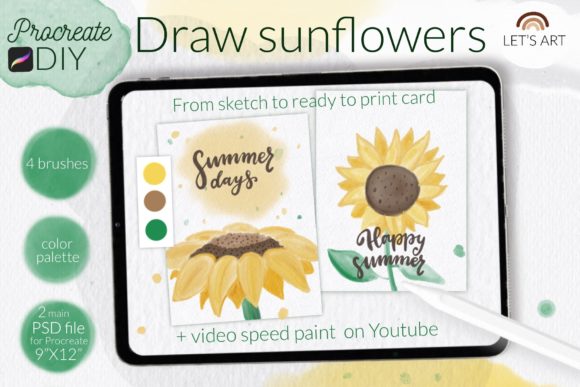
Understanding the assets you are working with is the first step to mastering any new design asset. The DIY Procreate Watercolor. Sunflowers collection is curated to ensure you have everything necessary to produce stunning greeting cards, prints, or social media content. Here is exactly what you will receive in your download package:
- 2 PSD Files: These are your canvases. Designed at 9"x12" with a high resolution of 300 dpi, these files are perfect for both digital display and high-quality printing. They come pre-loaded with a realistic watercolor paper background texture, which is essential for making digital watercolors look authentic. One file is a blank canvas for freeform painting, while the other serves as a detailed coloring page for those who prefer to focus on the painting technique itself.
- 4 Custom Brushes: You get the Honey watercolor brush for that rich, flowing pigment, the Lettering smooth brush for adding text or fine lines, a background tone brush for laying down washes, and a soft pencil for sketching initial details.
- 1 Color Swatches Palette: Color theory in watercolor can be tricky. I’ve included a pre-made color swatch file so you can load the exact palette used in the tutorials, ensuring your sunflowers have that perfect golden glow and deep foliage contrast.
- Video & Visual Guides: Learning by watching is often the most effective method. The kit includes access to 2 video tutorials on my YouTube channel, walking you through the process step-by-step. Additionally, you receive 2 step-by-step guides in JPG format that you can keep on your desk or second screen for quick reference.
The visual style of this kit leans into the "imperfect" nature of watercolor. It embraces the texture of the paper and the natural variation of the brush strokes. This style is incredibly popular in modern editorial design and packaging design because it adds a human touch that sterile vector graphics often lack.
Practical Applications: From Branding to Personal Projects
So, you have the kit—now what? The versatility of DIY Procreate Watercolor. Sunflowers allows it to fit into a wide variety of professional and personal workflows. As someone who works in brand strategy, I often look for assets that can help a brand feel more approachable and organic.
For small business owners, particularly those in the floral, wedding, or artisanal food industries, these watercolor elements are gold. You can use the sunflower motifs to create unique logo design elements, custom thank-you cards for customers, or eye-catching social media graphics that stand out in a crowded feed. The organic nature of the watercolor texture helps build a brand identity that feels warm and trustworthy.
For content creators and bloggers, consistency is key. By using the provided color swatches and brushes, you can maintain a cohesive aesthetic across your Instagram stories, Pinterest pins, and website headers. The ability to paint directly on the iPad means you can iterate quickly. Did you make a mistake? Just undo. Want to change the color of a petal? Use the recolor tool. This flexibility is something traditional watercolor cannot offer.
Even if you are a hobbyist, the value lies in the relaxation and the result. Creating a finished piece of art that you can actually print and frame—or turn into a physical greeting card for a loved one—is incredibly satisfying. The "Paint with Me" format takes the pressure off coming up with a composition from scratch, allowing you to simply enjoy the process of applying color.
Integrating the Kit into Your Design Workflow
When working with premium font styles and design assets, compatibility and usability are paramount. One of the standout features of this collection is the file compatibility. The PSD files are optimized for Procreate, but they can also be opened in Photoshop, giving you flexibility if you move between devices.
However, the real magic happens in Procreate. If you are using an older iPad or a version of Procreate earlier than 4.0, please note that the .brushset file format may not be available. In this case, you will need to install the individual .brush files manually. It’s a simple process: download the folder containing the .brush files to your iPad, open your file manager, locate the file, and tap it to import it into Procreate. For those with updated software, the .brushset file allows you to install all four brushes at once with a single tap.
Design Observations and Pairing Tips
When you start composing your sunflower scene, think about visual hierarchy. The heavy texture of the watercolor brushes is excellent for focal points, but if you plan to add text—perhaps for a greeting card or a blog post title—you need to ensure readability.
Because the DIY Procreate Watercolor. Sunflowers style is quite expressive, it pairs best with clean, legible typography. Avoid using script fonts or overly decorative handwritten fonts over the detailed flower areas, as this can create visual clutter. Instead, try pairing your watercolor art with a modern sans serif font for a clean, contemporary look, or a classic serif font for a more elegant, editorial feel.
For example, if you are designing a wedding invitation, you might paint the sunflowers as a border. In the center, use a sophisticated serif typeface for the names and a sans serif for the details. This contrast ensures that the artistic elements enhance the message rather than obscuring it.
Commercial Use and Final Thoughts
It is important to understand the licensing for your assets. This kit is designed to empower your creativity, whether for personal joy or commercial gain. You can use the artwork you create with these assets for client projects, merchandise, or digital products. The only restriction is that you cannot resell the source files (the brushes, swatches, or templates) themselves.
I encourage you to experiment. Use the soft pencil brush to sketch out rough ideas before committing to the Honey watercolor brush. Use the background tone to create atmospheric depth behind your sunflowers. And most importantly, share your work. Use the hashtag #letsart_Procreate_DIY on Instagram so I can see what you’ve made. I love seeing how different artists interpret the same tools.
Happy drawing! Whether you are sending a digital card to a friend or building a portfolio of floral illustrations, this kit is your starting point for something beautiful.