Character Builder Drawing Toolkit: Create Characters in Seconds
Drawing characters from scratch is one of those creative tasks that sounds simple but often ends in frustration. You have the idea clear in your head—a friendly mascot, a quirky comic hero, a retro-style illustration character—but translating that vision onto the canvas feels like wrestling with proportions, anatomy, and style all at once. The Character Builder Drawing Toolkit exists specifically to bridge that gap between imagination and execution, offering a practical collection of drawing shapes, brushes, and objects designed to help you sketch character wireframes in seconds rather than hours.
What Makes This Drawing Toolkit Different
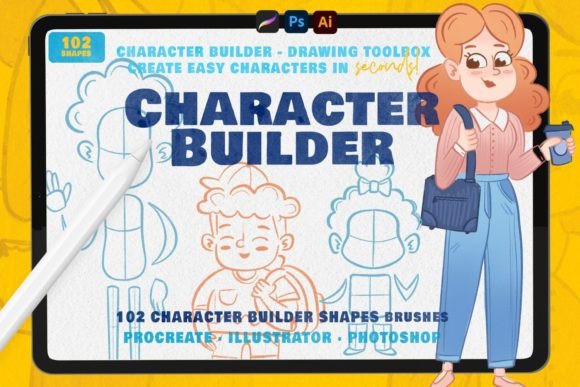
This is not a clipart library or a set of pre-made characters you simply drop into a project. The Character Builder Drawing Toolkit provides 102 authentic drawing shapes and brushes that function as building blocks. Think of them as a visual vocabulary—individual elements like hands, mouths, hairstyles, legs, body shapes, eyes, and noses that you combine, adjust, and customize to create original characters with genuine personality.
The approach is genuinely hands-on. You select a brush or shape, choose your paint tool, and start building a character wireframe. The color and stroke width adjust easily, which means you maintain full creative control over the final look. Whether you want bold, chunky lines for a children's book illustration or finer strokes for a detailed comic panel, the toolkit adapts to your style rather than forcing you into a predetermined aesthetic.
What stands out visually is the versatility. These elements work across multiple illustration styles—from flat, modern character design to halftone comic aesthetics to retro-inspired artwork. You are not locked into one look. The hundreds of possible combinations mean you can develop a consistent character style for a brand identity project one day and experiment with completely different proportions and expressions the next.
Where Character Design Meets Real Creative Projects
For designers, marketers, and content creators, character illustration serves a much larger purpose than decoration. A well-designed character becomes a recognizable brand asset, a storytelling device, and an engagement tool all at once. The Character Builder Drawing Toolkit supports this kind of strategic creative work because it speeds up the exploration phase dramatically.
Consider these practical applications:
- Brand mascots and identity work — Quickly sketch multiple character concepts for client presentations without investing hours in each variation. The toolkit lets you test different body shapes, facial expressions, and poses efficiently, which is invaluable during the ideation phase of logo design and brand identity projects.
- Children's book and editorial illustration — Build consistent characters across multiple pages and scenes. When you need the same character in different poses or emotional states, having a library of interchangeable body parts and features keeps the style cohesive.
- Social media graphics and content marketing — Create original, eye-catching characters for posts, stories, and campaigns. Custom character illustration stands out in feeds saturated with stock imagery, and the toolkit makes producing that original content accessible even if character drawing is not your primary skill.
- Comic and halftone projects — The brush styles lend themselves naturally to sequential art, retro illustration, and graphic novel work where character consistency across panels is essential.
- Packaging design and product illustration — Develop friendly, approachable characters for product labels, box art, and promotional materials. The vector compatibility in Illustrator makes scaling for different print formats straightforward.
- Web design and digital projects — Custom character illustrations add personality to landing pages, onboarding flows, and app interfaces in ways that generic stock illustrations cannot match.
Compatibility and How to Get Started
The Character Builder Drawing Toolkit is available for three major creative platforms: Adobe Photoshop, Adobe Illustrator, and Procreate. This cross-platform availability matters because many creative professionals work across multiple tools depending on the project. A designer might sketch character concepts in Procreate on an iPad during a commute, then refine and finalize in Illustrator for a print-ready deliverable.
It is worth noting a practical detail: the brushes themselves are designed for Procreate and Photoshop, while the Illustrator version comes as a .ai vector file containing the shapes as editable vector objects. This distinction is useful to understand upfront so you can plan your workflow accordingly. In Illustrator, you work with the shapes as scalable vectors, which is ideal for projects that require resizing across different formats—from a small social media avatar to a large-format banner.
Building Better Characters Through Practice
Beyond the immediate utility for client and personal projects, the Character Builder Drawing Toolkit functions as an effective practice tool. Character drawing skills develop through repetition and experimentation, and having structured building blocks to work with accelerates that learning process.
Use the included shapes to isolate and practice specific features. Spend a session focusing entirely on different eye styles and expressions. Another session might explore hand positions and gestures. Body shape variations teach you about proportion and silhouette. Hairstyle brushes expose you to different approaches for rendering texture and volume. Over time, this focused practice translates into stronger freehand drawing skills even when you are not using the toolkit.
For hobbyists and crafters who enjoy character design as a creative outlet but do not have formal illustration training, this kind of guided practice is particularly valuable. It removes the intimidation of a blank canvas while still requiring you to make creative decisions about composition, style, and expression.
Practical Considerations for Your Workflow
Before integrating the Character Builder Drawing Toolkit into your projects, consider a few practical points that will help you get the most value from the asset:
- Test with your actual software version — Brush behavior can vary slightly between software updates. Run a quick test session to confirm the brushes perform as expected in your specific version of Procreate, Photoshop, or Illustrator.
- Establish a character style guide early — When using the toolkit for a brand or series project, document which specific shapes, proportions, and stroke widths you are using. This creates consistency across multiple illustrations and makes collaboration with other designers smoother.
- Explore unexpected combinations — The most distinctive characters often come from pairing elements in ways that break convention. Combine different style elements and see what personality emerges. A retro body shape with modern facial features, for example, can create something genuinely original.
- Layer your workflow — Use the toolkit for the initial wireframe and structural phase, then add your own details, textures, and color work on top. The toolkit is a starting point, not a complete solution, and your creative input is what makes each character unique.
- Review licensing for commercial projects — If you plan to use characters created with the toolkit in commercial work—whether for clients, merchandise, or published content—review the included licensing terms to confirm they align with your intended use.
Why Speed Matters in Character Design
In professional creative work, time is a genuine constraint. A designer pitching character concepts to a client might need to present five to ten distinct directions in a single meeting. A content creator producing weekly social media graphics needs to maintain visual freshness without spending days on each post. A small business owner developing their brand mascot needs to explore options without budgeting for weeks of custom illustration.
The Character Builder Drawing Toolkit addresses this reality directly. By providing ready-to-use structural elements that you combine and customize, it compresses the most time-consuming part of character illustration—getting the basic wireframe and proportions right—into a matter of minutes. The time you save on structure is time you can invest in the creative details that make a character memorable: personality, expression, color, and context.
This is not about cutting corners. It is about working intelligently with tools that handle the mechanical groundwork so you can focus on the creative decisions that actually differentiate your work. Whether you are a professional designer managing multiple projects, a marketer building visual content at scale, or a hobbyist who wants to spend more time creating and less time struggling with anatomy, the toolkit serves as a practical foundation for better, faster character illustration.